
【SIM / eSIM Travel Data Cards】USA 5G Data Roaming SIM Card – 3/5/6/7/8/10/15/30 Days (Includes Standard HK Mail Delivery)
Description
📞 eSIM Introduction
What is eSIM?
eSIM (Embedded SIM), also known as an “embedded SIM card” or “virtual SIM card”, is a digital SIM solution built into your smartphone. Unlike traditional physical SIM cards, eSIM does not require removing or inserting a card; you only need to scan a dedicated QR code and follow the on-screen instructions to download and activate a data plan directly to your phone.
For travellers, the biggest advantages of eSIM are convenience, speed and not needing to swap cards. You no longer have to queue at a store to collect a physical card, wait for delivery, or worry about losing it. As long as you complete the setup in advance, you can connect to the internet as soon as you arrive at your destination—perfect for short trips or layover routes.
📌 Before You Buy
Please confirm your smartphone and operating system support eSIM functionality. We recommend checking the official website or phone settings for the option “Add a cellular plan / Add eSIM”, and ensure your device is not carrier‑locked. If your device is not compatible, orders cannot be refunded.
eSIM can only be used on devices that support eSIM; if your phone does not show “Add cellular plan / Add eSIM”, it usually means it does not support eSIM.
Each QR code can usually be installed only once and is bound to one device. If you delete the eSIM profile by mistake, you typically cannot rescan the same QR code and will need to purchase again.
Before installing an eSIM, please ensure you have stable Wi‑Fi or another available network, since the eSIM profile needs to be downloaded and activated via the internet.
We recommend completing the installation and setup before you depart, to avoid connectivity issues upon arrival.
Many travel eSIMs are activated the first time you connect to the local network in your destination country. Some plans also have an activation time limit, so please check the validity period after purchase.
During use, remember to turn off data roaming on your original SIM card to avoid accidentally using your home‑network data and incurring high roaming charges.
Some eSIM plans do not support hotspot sharing, voice calls or SMS functions. Please confirm the plan details before purchasing to ensure they meet your needs.
eSIM data plans usually cannot be topped up; when your data is exhausted, you must purchase a new plan.
If your phone’s storage is full, your OS version is too old, or the QR code has become invalid, installation may fail.
If you plan to switch phones, factory‑reset your device or restore to factory settings, your eSIM may need to be reconfigured and some providers may charge a reactivation fee.
Please keep your QR code, order confirmation and installation instructions for future reference or troubleshooting.
📶 How to Use
iOS
Go to Settings → Cellular/Mobile Data → Add Cellular Plan.
When the scanning window appears, scan the QR code.
After the profile is downloaded, follow the basic on‑screen setup steps.
Android
Go to Settings → Network & internet → Mobile network.
When prompted “Would you like to download a SIM card?”, choose Yes.
When the scanning screen appears, scan the QR code.
💬 Frequently Asked Questions
1. How do I view my ICCID?
Please first confirm that your eSIM has been successfully installed and mobile data is enabled, then go to Settings → General → About → eSIM to view the ICCID. If it does not appear, verify that the eSIM has been activated.
2. My eSIM is activated but cannot connect to the internet. What should I do?
Please restart your device and check that the eSIM is set as the primary mobile data line. If the connection still fails, try updating to the latest iOS version. Also check that Airplane Mode, data roaming and network settings are properly configured.
3. My eSIM cannot share a hotspot. How can I fix this?
If your eSIM can connect normally but cannot share a hotspot, please check the following items in order:
Confirm whether your phone is a contract phone, carrier‑locked device or otherwise restricted.
Turn off VPN and retest hotspot sharing.
Confirm that data roaming is enabled.
Confirm that the eSIM is set as the primary number or main data source.
Check that your phone is updated to the latest iOS version.
Try using a physical SIM card to turn on hotspot sharing first, confirm that the hotspot is working, then switch to the eSIM while keeping the hotspot on.
If the above steps do not resolve the issue, please contact customer service for assistance.
4. What types of eSIM data plans are available?
We offer multiple flexible data plans, including daily‑quota plans (a fixed high‑speed data allowance per day, followed by reduced speed) and total‑quota plans (a fixed total data allowance that stops when exhausted). Please choose the plan that best fits your trip length and usage habits, such as how often you watch videos or make video calls.
5. What is the speed and coverage like for eSIM?
eSIM is connected through local major carriers. In major hotel areas and popular tourist spots, you can generally enjoy stable 4G connectivity. Signals may be weaker in remote areas or on the open sea, but the connection is usually sufficient for navigation, messaging and basic browsing.
6. Are there pure‑data‑only eSIM options?
Most travel eSIMs are pure‑data plans, without local voice calls or SMS functions. These plans are ideal for users who mainly rely on WhatsApp, Line or other messaging apps to stay in touch, allowing you to focus on navigation, searching travel information and social posting.
7. When is the best time to install and activate eSIM?
To prevent the system from counting usage days too early, we strongly recommend installing and activating your eSIM after you arrive at your destination. After purchase you will receive a QR code; you can pre‑add the profile to your phone, but please keep it disabled until you arrive and enable data roaming, to avoid accidentally triggering activation.
8. How do I buy a travel eSIM?
You can place an order directly with us. After completing your purchase, the electronic voucher and QR code will be sent immediately to your email inbox. This digital delivery lets you skip the hassle of collecting a physical card and prepare your travel data connection anytime, anywhere.
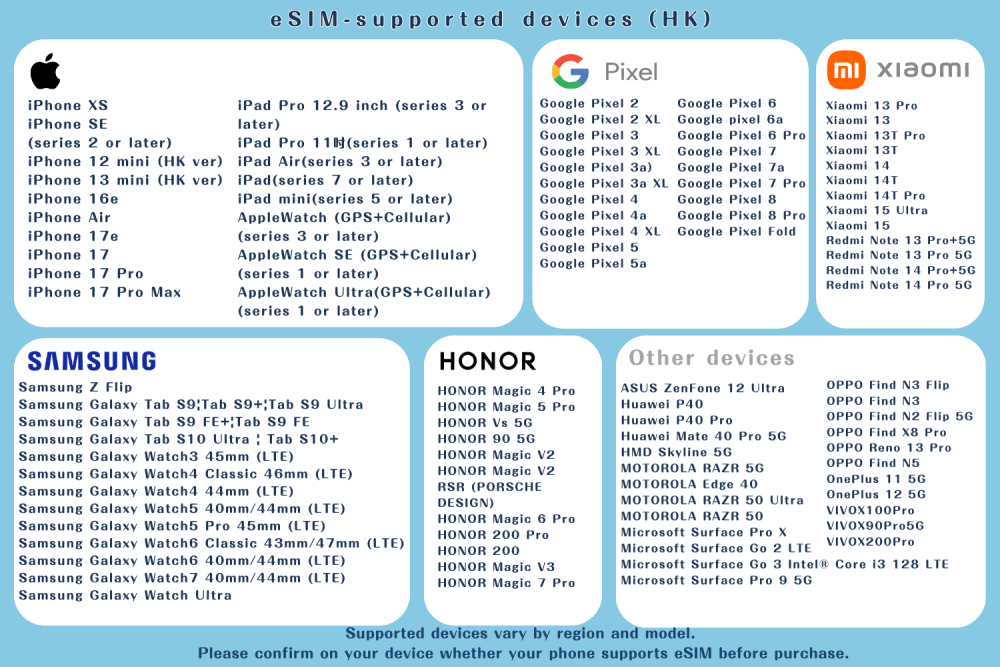
Supported devices vary by region and model. Please confirm on your device whether your phone supports eSIM before purchase.
Terms & Conditions
Thank you for using Young's Holidays E-Shop. By using our website, you agree to the following terms and conditions:
1. Ordering
- All orders must be placed through our online store.
- Once we receive your order, we will confirm it via WhatsApp or phone within 2 business days.
- Orders may be delayed due to unforeseen circumstances, and in such cases we will notify you promptly.
- Young's Holidays reserves the right to make the final decision on all orders.
2. Delivery and Collection
- Standard Hong Kong surface mail is included in the price. If express delivery or other shipping methods are required, additional shipping fees will apply. Please note that no refunds will be provided if surface mail is lost in transit.
- Collection service: You may arrange free self‑collection with Young's Holidays. Collection details will be provided upon order confirmation.
Please ensure that someone is available to receive the delivery. If delivery is unsuccessful, additional reshipping fees may be charged.
3. Payment
- The full payment for each order must be made at the time of purchase, using the accepted payment methods.
We do not store your payment information. All transactions are processed via secure payment systems.
4. About the Product
- This product provides data internet service only and does not include a local phone number, voice calls, or SMS services.
- If you wish to increase data usage, please purchase a new plan directly. The system will automatically send a new eSIM voucher; the former plan will not be merged or extended.
- In accordance with the carrier’s Fair Usage Policy, if a user consumes a large amount of data in a short period of time, the carrier reserves the right to limit the speed or data allowance. Please avoid long‑time video streaming, high‑frequency large‑file downloads or bulk uploads.
- This product may support hotspot sharing; however, whether hotspot sharing works depends on your phone model and operating system settings. If hotspot sharing is not supported due to device limitations, no refund will be provided.
- Actual internet quality may vary depending on location, terrain, building obstructions, number of users and weather conditions. Please note and accept these potential limitations.
- Please confirm that the selected data plan and number of days are correct before placing an order. No cancellations or changes will be accepted once the eSIM voucher is issued.
- If certain apps (such as TikTok, ChatGPT, etc.) cannot be used due to device incompatibility, phone settings or regional restrictions, no refund will be provided.
- The actual activation time of the eSIM is not tied to the “travel date” selected at the time of purchase, but is determined by the first time it connects to the internet upon arrival at the destination. The selected date serves only as a reference for activation scheduling and does not imply immediate activation.
- The usage period is calculated on a 24‑hour basis. For example: if you purchase a 3‑day data plan and activate it at 10:00 am on 1 September, the service will end at 9:59 am on 4 September.
- Once the eSIM has been issued, it must be activated within 90 days. We recommend activating it as soon as possible after arrival at your destination to ensure full enjoyment of your entitlement.
- If there is an issue with usage but there is no record of you contacting customer service for troubleshooting after purchase, and the cause cannot be determined, no refund will be provided.
- If you receive an error message when scanning the QR code, this does not necessarily mean that the eSIM has expired. Please restart your device first, then go to Settings → Cellular / Mobile Data and confirm that the eSIM has been successfully added.
- If you install the eSIM before arriving at your destination and see a message such as “Activating” or “Cannot activate eSIM”, do not delete the eSIM. Instead, keep it disabled and re‑enable it after arrival. If you still cannot connect after arrival, please ensure that data roaming is enabled, then try restarting the device or manually selecting a supported network.
- This service uses international roaming IP. Some apps (for example TikTok, ChatGPT, etc.) may not function properly due to IP‑location restrictions. We apologise for any inconvenience.
- Once the order is successfully placed, it cannot be cancelled or modified, and no refunds will be accepted.
5. Liability
- We are not responsible for any indirect, incidental, or consequential damages arising from the use of our products.
- Our total liability does not exceed the amount paid for the product.
If you have any questions or concerns regarding these terms, please contact us.